Craft?
Yep, for sure! I have been creating various crafty projects for over 30 years. (I know….that sounds so long EEK). Over the years I have tackled all sorts of crafts from general sewing and making my kid’s clothing when they were growing up to pottery, ceramics, and even lead lighting. If you can think of it… I have probably had a dabble in it. Over the last few years, my main focus has been embroidering all sorts of items and creating various projects with my Brother Scan N Cut. I still play with other new crafty ventures as they come along as I love to learn but this site is primarily designed to inspire you with one of my main focus areas which is creating crafts using an electronic cutting machine. I love my Brother Scan N Cut machines! In my craft room, I have the CM900 and the SDX2200D Disney model which is an auto-blade model. Both are awesome.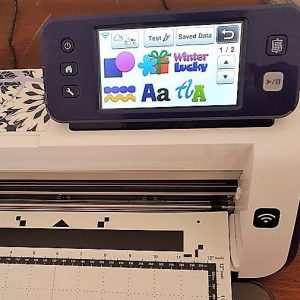
Now that leads me to the next passion of mine – Techie stuff
Yep, I am a bit of a tech nerd. I worked in the Information Technology area for the last 25 years. Most of this time was enabling student learning in our South Australian TAFE college which has numerous campuses across the state. Over the last few years, I have had a very techie-craft focus. You know the sorts of things, working out how to design craft and embroidery files from scratch. Plus, becoming proficient in using the functions of the various embroidery and cutting machines and working out troubleshooting methods. Acquiring knowledge of software like Brother’s Canvas Workspace, PE Design, SCAL5, Affinity Designer, and Inkscape. I also use the Cricut software with my Cricut Maker to test my designs for use by Cricut crafters. … lots of different software. This knowledge is where I can help you! I have created tutorials, free templates, and courses to make your creative journey as easy as possible for you.This entire website is designed for just you!
In addition to the website, the Scan N Cut – Let’s Create With Sue Facebook group and Create With Sue page are to assist and inform you of new things as they happen. (and a bonus – first look at the new templates)Wander your way around the website as you will find so many tutorials for all sorts of projects. I am constantly adding more projects and designs and I do hope that you find the website useful and really enjoy using it.
Happy creating,


I’m so glad I found you!! My husband bought me a scan n cut a year ago and I’ve not quite got the hang of it yet. It’s very frustrating. But now I expect I’ll be a wiz in no time. Thanks so much!!
Thank you! Have you found my free course and facebook group? Both are there to provide additional help x
Hello Sue,
What a great resource. I’m looking to buy a scan and cut for cutting out drawings on paper. Can you advise what machine might be best suited for this task? I’d like it to be as straightforward as possible, where I draw it and the machine scans and cuts it out leaving the drawn outline. The paper would be like a card stock or decent drawing paper (not thin like copy paper). Thanks!
Hello Micah, all the Scan N Cut machines will Scan designs. I have a post on choosing a Scan N Cut and what to look for. You definitely do not need the most expensive model. https://www.createwithsue.com/how-to-choose-a-scan-n-cut-to-buy/
Which model you choose will be determined somewhat by which country you live in. I have covered a few countries in the post. You are welcome to ask me more questions if you need further assistance. 🙂 Sue
I’m teaching a beginner ScanNCut class and I would like permission to reproduce your SDX Cheat sheets as a handout for my class. These are extremely good and great reference. Your web site and branding will be maintained. I have 20 students. Thanks for your consideration.
Leslie
Hi Leslie, I am really pleased that you have found the cheat sheets so helpful. Thank you for letting me know. Please email me at [email protected] regarding your request.